
Overview
Financial advisors use Integrately to automate routine but essential tasks within Wealthbox and between third-party tools. Integrately connects Wealthbox to over 450 applications, supporting a wide range of software platforms and use cases.
This integration enables Wealthbox users to streamline daily operations, eliminate manual data entry, and improve overall productivity by automating repetitive tasks through a simple, no-code interface.
Note: Wealthbox does not build or maintain individual automation templates in Integrately. All automation flows must be created and managed by the user within their Integrately account.
Key Features
Automate workflows between Wealthbox and 1,000+ apps using Integrately’s no-code platform
Create contacts in Wealthbox from form submissions, marketing platforms, and other tools
Automatically update Wealthbox tasks, events, or opportunities based on triggers from external apps
Sync new activities or updates in third-party apps directly to Wealthbox client records
Build multi-step workflows with custom triggers and actions, without writing code
How to Enable the Integration
To get started with Integrately and Wealthbox:
Go to Integrately and log in or create a free account.
In the search bar, type and select Wealthbox CRM.
Select the app you want to integrate with Wealthbox (e.g., Google Sheets, Mailchimp, Typeform, etc.).
Browse pre-built automation templates or click Create Your Own Automation.
-
When prompted to connect your Wealthbox account:
You’ll need to enter your Wealthbox API Key.
To generate your API Key, go to Settings > API Access > Create Access Token in your Wealthbox account.
Follow the step-by-step instructions within Integrately to complete your automation setup.
Note: You must be an authorized Wealthbox user with permission to generate API keys.
How Does the Integrately Integration Work?
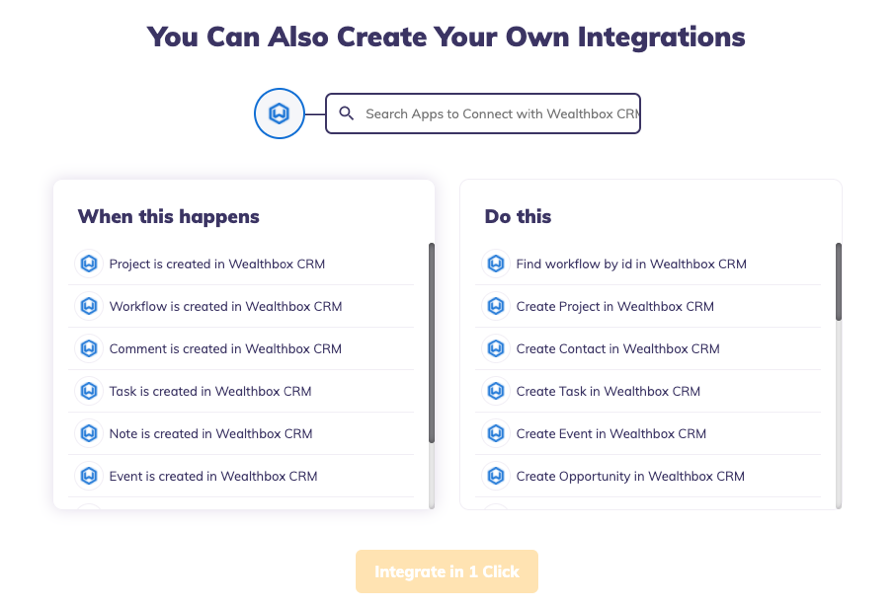
The Integrately integration enables trigger-action automation between Wealthbox and other apps. When an event occurs in a connected app (the trigger), it automatically performs an action in Wealthbox — or vice versa.
Examples:
When a form is submitted in Typeform → Create a new contact in Wealthbox
When a new lead is added to a Mailchimp list → Add a task or opportunity in Wealthbox
When a task is marked complete in Trello → Log an event or note in Wealthbox
Data Handling & Matching:
Integrately uses Wealthbox's open API to push and pull data based on user-defined workflows
Matching is typically based on fields like email address or contact name, depending on how your automation is configured
Data Sync Schedule:
Automations typically run in near real-time but may vary slightly depending on the third-party app’s sync frequency and your Integrately plan
Demo/Guide:
While there is no Wealthbox-specific demo video, you can explore Integrately’s tutorials for guidance on building workflows.
Troubleshooting & FAQs
Why isn’t my Wealthbox data syncing correctly?
Double-check your API token in Wealthbox is active and correctly entered into Integrately.
Ensure your automation is turned on and properly mapped.
Review field matching to ensure the correct data is being pulled or pushed.
Can I use Wealthbox as both a trigger and an action app in Integrately?
Yes. You can trigger actions in other apps based on updates in Wealthbox or perform actions within Wealthbox based on events in other apps.
Does Wealthbox support multi-step automations through Integrately?
Yes, you can chain multiple steps in a single automation using Integrately's builder.